How to Log into QuikCheK
1. Double Click your QuikCheK icon.
2. Click Login.
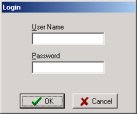
3. Enter your username and password. You can enter "demo" as the username,
and leave the password blank, or use your own login
name and password if you have one.
4. Click QuikCheK to load QuikCheK.
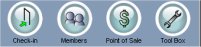
5. When the program has completed loading, you will see module buttons at the
top of the screen. Check-in is used for checking members
into the club. Members is where all your member information is located, and
POS is your point of sale program.