How to use Demo
data or Your data
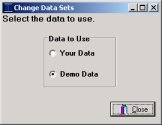
QuikCheK software comes with two sets of usable data. Demodata is used for training purposes. Your Data is used for entering YOUR members into the system.
To switch between the two datasets
Click START - Programs - QuikCheK - DataChange.
When the next window pops up, select which data set you would like to choose then press CLOSE.